
AI answers and required fields
How form answers are produced and checked.
Applivo answers screening questions from your profile and resume, then validates them. The guiding rule is safety: a required question with no trustworthy answer stops the item rather than being guessed at.
How it works
- The extension detects the visible fields and their labels.
- It sends the field metadata to the server, which composes context from your profile and resume.
- The managed AI provider returns candidate answers.
- The extension injects the answers and re-checks the form before proceeding.
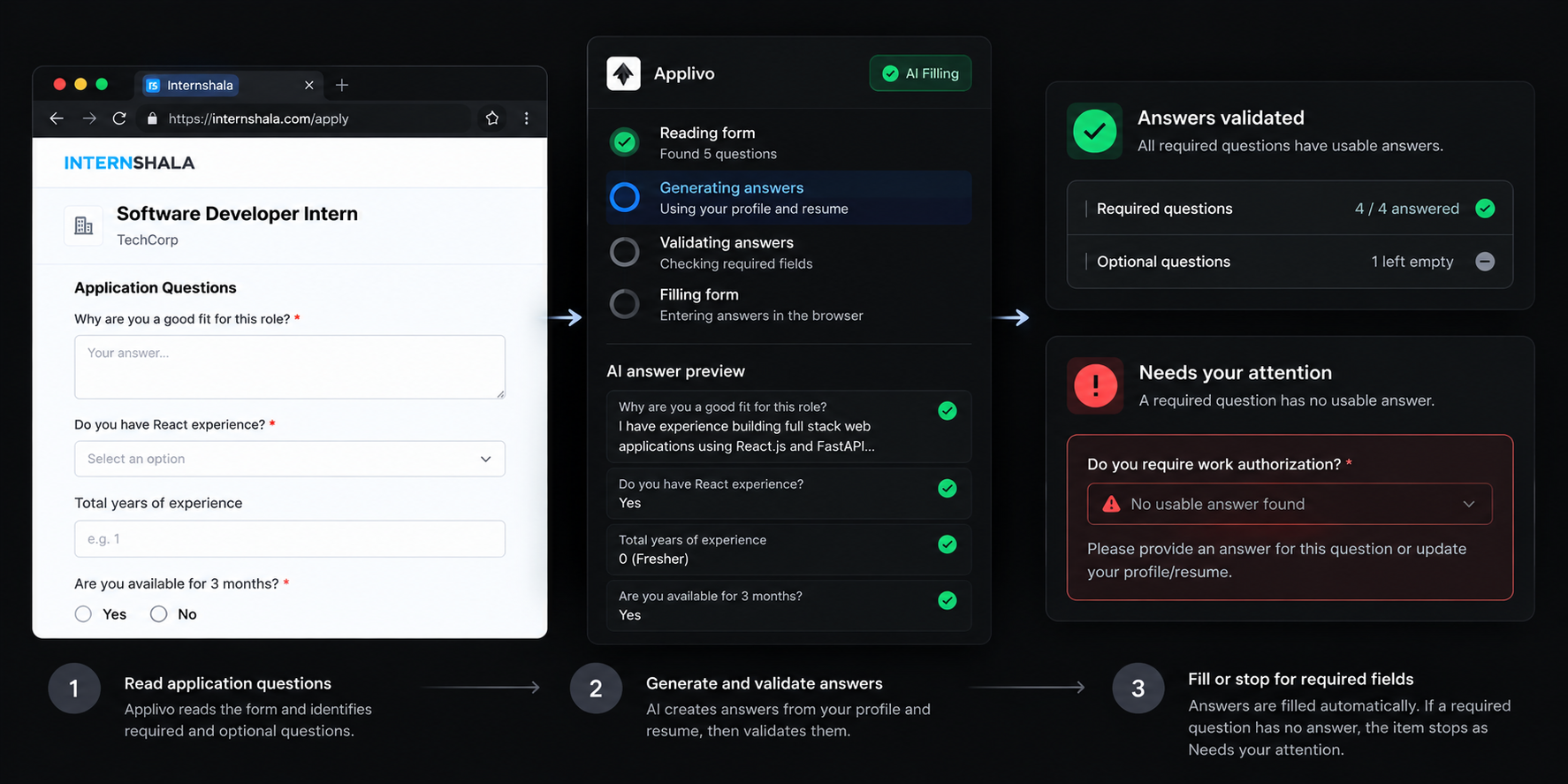
Required vs optional
- Required questions that cannot be answered stop the item as needing your attention.
- Optional questions that cannot be answered are left empty and do not block submission.
- A field is treated as required when the site marks it required, with an asterisk, or with a "(required)" label.
Safe handling rules
- Placeholder text in a box is never treated as the question.
- Hidden parts of a multi-step form are ignored until they are shown.
- Unknown or ambiguous fields are not guessed at.
- Optional marketing checkboxes are not ticked.
When AI answers are unavailable
If your AI allowance is used up or the provider is unreachable, required questions stay open and the item stops with a message that AI answers are unavailable. You can answer manually and retry.