
Application automation overview
How the website and the Chrome extension work together to apply on your behalf.
Applivo applies through a Chrome extension that works in your own browser session. The website creates and authorizes a run on the server; the extension then opens each application, fills it, validates it and submits it. This design means applications come from your own browser, IP address and signed-in Internshala session, rather than from a server acting as you.
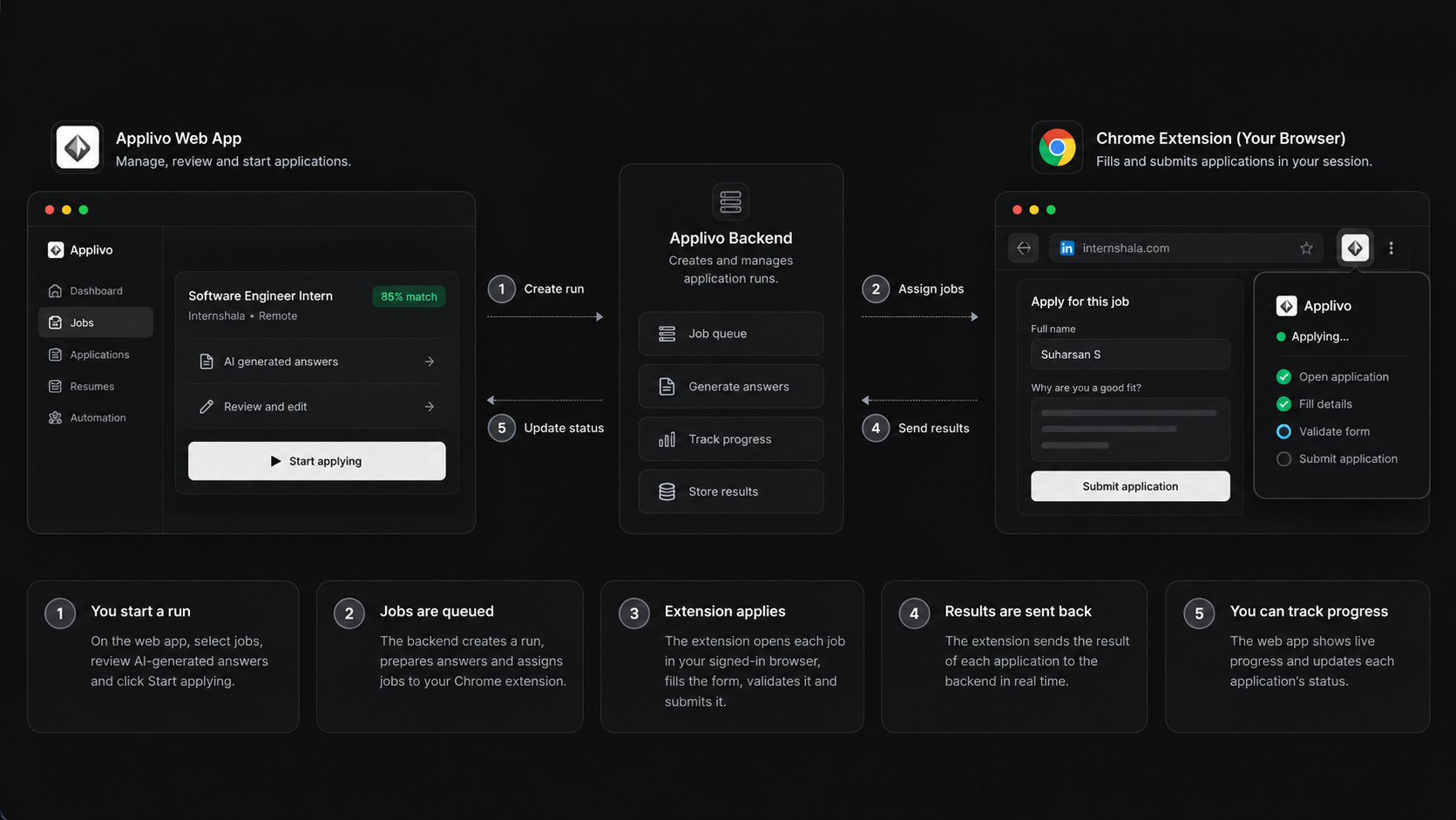
How the split works
| Part | Responsibility |
|---|---|
| Applivo server | Holds your profile and resume, generates AI answers, decides entitlement, creates and authorizes runs, records outcomes |
| Applivo website | Where you review jobs, queue applications, start and stop runs, and see progress |
| Chrome extension | Opens each form in your browser, fills it, validates it, and (when authorized) submits it |
| Your browser session | Your signed-in Internshala login is what lets the extension reach the forms |
How it behaves
- The extension uses one reusable background tab, in the same window as the Applivo tab that started the run. Applivo stays in front while the run works.
- It processes the selected applications one after another, in order.
- It does not open separate windows, run a headless browser, or change site security headers.
- The server decides whether a run is allowed: your plan, your daily quota, and the authorization for each submission are all checked server-side.
- One run is active at a time, covering up to 30 applications.
- Only Internshala is supported.
Two run modes
- Review mode: the extension fills the form and stops before submitting, leaving it ready for you to submit.
- Auto-submit mode: you explicitly acknowledge automatic submission when starting the run, and the extension submits each form after validation.
In this section
Installing the extension
Load the Applivo extension into Chrome.
Connecting the extension to your account
Pair the extension with Applivo.
Eligibility and subscription requirements
Who can run the extension.
Supported websites
Where the extension works.
Starting an application run
Approve and begin applying.
Understanding the queue and run stages
What each stage in the run panel means.
AI answers and required fields
How form answers are produced and checked.
Resume attachments
Which resume is used when applying.
Application submission and confirmation
How Applivo decides an application really went through.
Login expiry, CAPTCHA and verification
What happens when the portal needs you.
Unsupported forms and ineligible applications
When Applivo will not apply, and why.
Extension permissions and privacy
What the extension can access and what it keeps.
Troubleshooting the extension
Connection and run problems.