
Internshala
Session-based internship sync, automated job discovery, and in-browser form pre-fill for verified student opportunities.

Overview
Internshala is South Asia's leading internship and early-career hiring platform. Applivo provides end-to-end integration with Internshala across two complementary components: background listing discovery via encrypted session state, and automated form filling via the Applivo Companion extension.
Through this integration, candidates can discover newly posted engineering, design, marketing, and management internships, evaluate match scores against their personal profile, and automate the tedious submission of repetitive screening questions like 'Why should you be hired for this role?' and 'Are you available for 6 months?'.
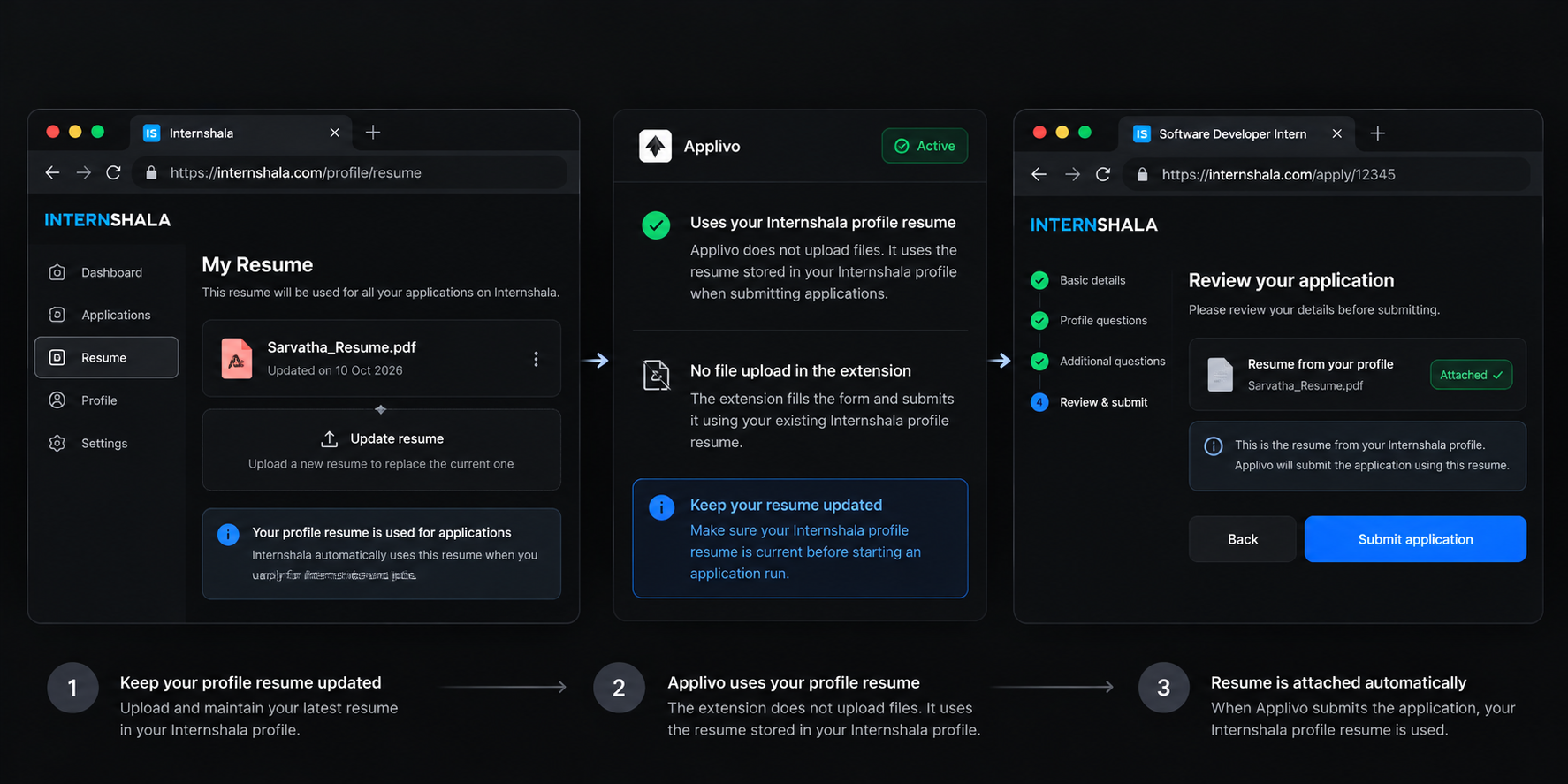
Configuration
To connect Internshala with Applivo:
- Navigate to Dashboard → Connections in Applivo.
- Locate the Internshala card and click Connect.
- A secure in-app browser window opens displaying the official Internshala login portal.
- Enter your Internshala credentials and complete any CAPTCHA verification requested.
- Once sign-in succeeds, Applivo captures your session cookies, encrypts them with AES-256-GCM, and stores them in your platform_cookies vault.
- Ensure the Applivo Companion Chrome extension is installed and paired with your account.
- The Internshala card turns green with status 'Connected' and displays your active account identifier.
How it works
The end-to-end Internshala integration operates across two synchronized pipelines:
- Discovery Pipeline: Applivo's background scraper (app/agents/scrapers/internshala.py) uses your encrypted session cookie to fetch internships matching your configured role preferences, locations, and minimum stipend. Listings are deduplicated and saved to the jobs table.
- Analysis Pipeline: Lumi evaluates the job description, required technical competencies, and responsibilities, assigning a 0-100% match score.
- Application Pipeline: When you launch an application run, the companion extension navigates directly to the Internshala internship URL in your authentic browser session.
- Form Filling Engine: The content script detects the application form modal, extracts all employer questions, retrieves AI-generated answers grounded in your profile, selects your preferred resume, and validates that all mandatory fields are complete.
- Outcome Confirmation: Upon successful submission, Applivo records the Internshala application ID, marks the job as Applied in your tracker, and emits an application.submitted event.
Available features
- Automated internship listing ingestion with stipend, location, and duration parsing.
- Real-time match scoring against student coursework, technical skills, and past projects.
- Pre-filling of standard employer questions: availability, cover letters, and project links.
- Support for Review Mode (preview answers before clicking Apply) and Auto-Submit Mode.
- Zero server-side password storage; session authentication uses encrypted token cookies.
- Automatic detection of closed listings and duplicate prior submissions.
Permissions and data access
| Component | Access Level | Purpose |
|---|---|---|
| Platform Cookie | Encrypted Session State | Used exclusively by background scraper to read verified listings on internshala.com. |
| Browser Extension | DOM Access on internshala.com | Injects candidate-approved answers into application input fields. |
| User Profile | Read-only | Feeds coursework, skills, and project descriptions into AI answer templates. |
| Job Tracker | Read/Write | Records application submission dates, employer IDs, and status changes. |
Troubleshooting
| Symptom | Likely Cause | Resolution |
|---|---|---|
| Connection status shows 'Needs Reauth' | Internshala session cookie expired (typically after 14-30 days) | Click Reconnect on the Connections page and log into Internshala again. |
| Scrape returns zero new listings | Internshala search filters too restrictive or CAPTCHA triggered | Broaden role preferences in Profile Settings or re-authenticate. |
| Extension fails to find application button | Internshala updated its internship page layout or listing has expired | Verify the internship is still open on Internshala.com; report UI issue if listing is active. |
| Form submission halted with red borders | Employer added a custom question not covered in candidate profile | Switch to the tab, answer the custom question manually, and submit. |
Frequently asked questions
Does Internshala ban accounts for using Applivo?
No. Because all application actions take place inside your personal Chrome browser window at human-paced intervals using your genuine IP address, your account exhibits standard browser traffic without bot signatures.
Can Applivo apply to internships that require an external test?
When an internship requires an external coding challenge or third-party assessment form, Applivo pre-fills all preliminary Internshala questions and flags the application for your manual completion of the external test.
Related articles
- Applivo Companion (Browser Extension)Authentic in-browser application filling and status companion powered by Chrome Manifest V3.
- Connecting Internshala (Step-by-Step)Detailed walkthrough for authenticating and establishing session synchronization with Internshala.
- Job discovery overviewHow listings get into Applivo and what you can do with them.
- Troubleshooting connectionsComprehensive diagnostic matrix across OAuth handshakes, webhook deliveries, session drops, and provider limits.