
Applivo Companion (Browser Extension)
Authentic in-browser application filling and status companion powered by Chrome Manifest V3.
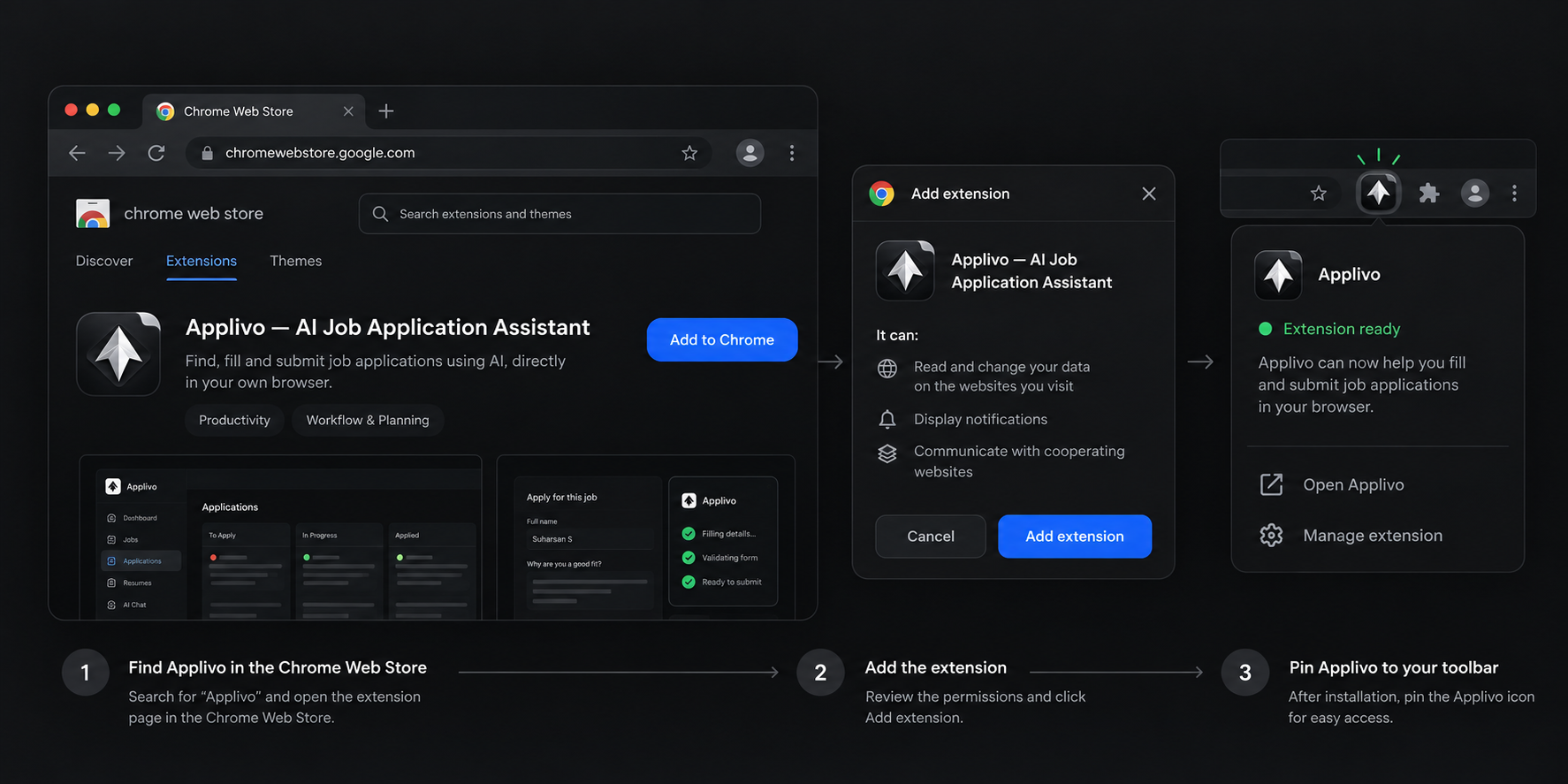
Overview
The Applivo Companion is the official Manifest V3 Chrome extension that bridges your Applivo account with external job application portals. Rather than executing automated applications from a remote cloud server—which risks triggering anti-bot protections, IP bans, and CAPTCHA walls—the extension operates directly within your own browser window using your authentic local IP address and active login sessions.
The companion acts as a focused status monitor and execution engine. It displays live run progress, token status, and subscription tier validation, while deferring all complex configuration and job management to the main Applivo dashboard.
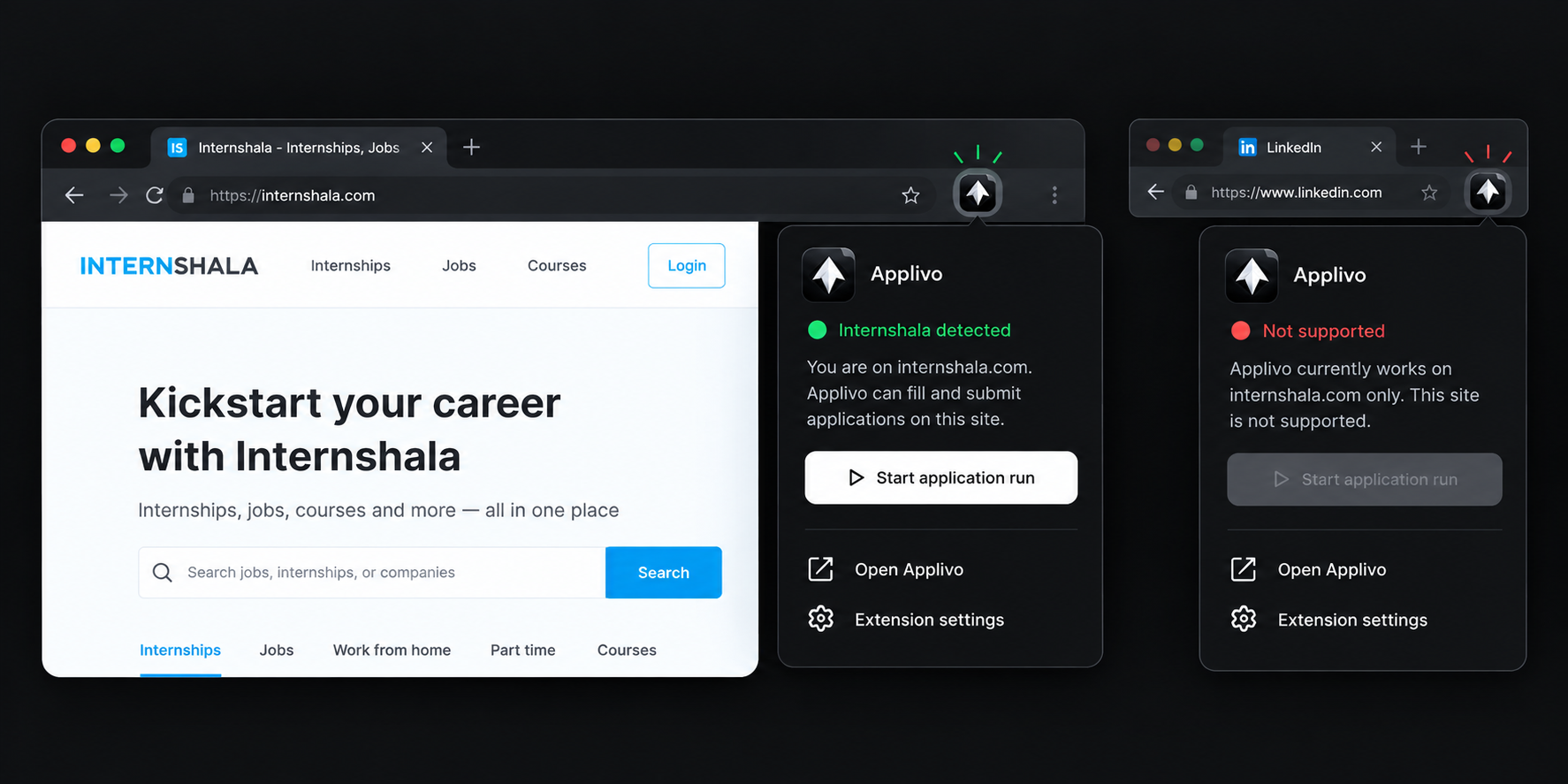
Configuration
Follow these actionable steps to install and pair the companion with your account:
- Build the extension locally using python3 extension/build.py (for production) or python3 extension/build.py --dev (for local development).
- Open Google Chrome and navigate to chrome://extensions.
- Enable Developer mode using the toggle in the top-right corner of the extensions page.
- Click Load unpacked and select the generated extension/dist (or extension/dist-dev) folder.
- Pin the Applivo icon to your Chrome toolbar for persistent status visibility.
- Log into your Applivo dashboard with an active Pro or Premium subscription.
- Open the extension popup and click Connect Account. The dashboard initiates the PKCE pairing flow automatically.
- Confirm the pairing prompt in your dashboard. The extension receives an isolated ext_token and transitions to Ready.
How it works
The companion couples closely with Applivo's ext_runs backend service through a secure cryptographic lifecycle:
- 1. PKCE Pairing: The extension generates a cryptographically random 32-byte verifier and SHA-256 challenge. The Applivo server issues a one-time exchange code that the extension redeems directly at POST /api/ext/pair/exchange for an isolated ext_token.
- 2. Queue Staging: You review matching jobs on the Applivo Jobs dashboard, select target listings, and click Start Application Run.
- 3. Single-Tab Execution: The extension opens a single, dedicated background tab in your current browser window, navigating sequentially to each target job portal.
- 4. DOM Inspection & AI Filling: The content script identifies form input fields, matches screening questions against your resume and profile answers, and fills the form elements.
- 5. Review vs Auto-Submit: In Review Mode, the extension stops with the filled form ready for your inspection. In Auto-Submit Mode (with candidate consent), it submits the application, captures the confirmation receipt, and reports success to POST /api/ext/runs/{run_id}/results.
- 6. Failure Resilience: If a CAPTCHA or multi-factor verification appears, the extension pauses, notifies you with an audio chime and dashboard alert, and waits for your manual intervention before continuing.
Available features
- Single-tab background automation running at candidate IP address without proxy detection.
- Cryptographic PKCE pairing eliminating manual API key entry or password sharing.
- Support for Review Mode (manual confirmation) and Auto-Submit Mode (hands-free processing).
- Real-time run stage reporting: Queued, Navigating, Filling, Reviewing, Submitted, Failed.
- Automatic resume PDF attachment from your stored resume vault.
- Graceful CAPTCHA attention pausing with automatic run resumption.
Permissions and data access
The extension requests strictly bounded Manifest V3 permissions:
| Permission | Type | Justification |
|---|---|---|
| storage | Local Browser | Stores isolated ext_token and current run ID in chrome.storage.local. |
| activeTab | Tab Context | Grants temporary DOM injection access only to the active application form. |
| scripting | DOM Execution | Executes content.js to extract form fields and insert candidate answers. |
| alarms | Lifecycle | Keeps the background service worker alive during long multi-step application runs. |
| host_permissions | Domain Restricted | Limited to https://internshala.com/*, https://api.applivo.in/*, and https://applivo.in/*. |
Troubleshooting
| Symptom | Likely Cause | Resolution |
|---|---|---|
| Popup shows 'Not Paired' | Extension has not completed PKCE handshake with dashboard | Log into dashboard, open extension popup, and click Connect Account. |
| Run fails with 403 Forbidden | User plan is Free tier or subscription expired | Upgrade to an active Pro or Premium plan to enable automation. |
| Extension pauses on application | Portal presented a CAPTCHA or email OTP challenge | Switch to the application tab, solve the challenge manually, and click Resume Run. |
| Form fields remain empty | Portal modified its DOM layout or uses unsupported iframes | Complete the field manually or report the unsupported form URL to support. |
Frequently asked questions
Does the extension access my passwords or browsing history?
No. The extension possesses zero permissions to access browser history, bookmarks, or saved passwords. Host permissions are strictly restricted to supported job portals and the Applivo API.
Can I run multiple application tabs at the same time?
No. To prevent anti-bot detection and preserve session stability, the extension executes applications sequentially in a single tab.
Related articles
- InternshalaSession-based internship sync, automated job discovery, and in-browser form pre-fill for verified student opportunities.
- Application automation overviewHow the website and the Chrome extension work together to apply on your behalf.
- Supported websitesWhere the extension works.
- Troubleshooting connectionsComprehensive diagnostic matrix across OAuth handshakes, webhook deliveries, session drops, and provider limits.